

Introduction
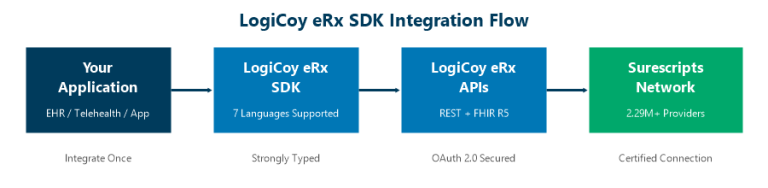
LogiCoy eRx SDKs are strongly typed client libraries for Java, Python, Node.js, C#, Go, Kotlin, and PHP that enable healthcare application developers to integrate electronic prescribing REST and FHIR R5 APIs in days instead of weeks.
Building healthcare applications requires connecting to ePrescribing networks, managing patient data, handling prescription workflows, and maintaining compliance with healthcare standards. Integrating these capabilities directly through REST APIs often means writing hundreds of lines of HTTP client code, managing authentication headers, and maintaining request/response models across updates. LogiCoy eRx SDKs eliminate that repetitive infrastructure work so development teams can focus on clinical workflows and patient outcomes.
The SDKs are generated directly from the OpenAPI specification using OpenAPI Generator 7.2.0, ensuring every SDK stays synchronized with the latest API capabilities and follows consistent design patterns across all supported languages.

Why Use an ePrescribing SDK Instead of Direct REST API Calls
Developers can integrate directly with any REST API using their preferred HTTP library. However, this approach requires building and maintaining significant amounts of repetitive code that adds no clinical value to the application.
Common Challenges with Direct API Integration
- Creating and managing HTTP request and response models manually
- Serializing and deserializing JSON payloads for every API call
- Handling OAuth 2.0 authentication headers on every request
- Managing API version updates and breaking changes
- Maintaining consistency across multiple services and projects
- Writing error handling and retry logic for network failures
Benefits of Using LogiCoy eRx SDKs
- Faster development cycles – integrate in days, not weeks
- Strongly typed models – compile-time validation reduces runtime errors
- Automatic authentication – OAuth bearer token included with every request
- Consistent experience – same programming model across all 7 languages
- Automatic serialization – no manual JSON parsing required
- Synchronized updates – SDKs regenerated from the latest OpenAPI spec
Supported Programming Languages for ePrescribing SDKs
LogiCoy provides SDKs for seven programming languages, covering the most popular technology stacks used in healthcare application development:
| Language | SDK Available | Common Use Case |
|---|---|---|
| Node.js / TypeScript | Yes | Telehealth platforms, modern web applications |
| Java | Yes | Enterprise EHR systems, Spring Boot applications |
| Python | Yes | Data analytics, clinical decision support tools |
| C# (.NET) | Yes | Hospital information systems, Windows-based EHRs |
| Go | Yes | High-performance microservices, cloud-native applications |
| Kotlin | Yes | Android health apps, modern JVM applications |
| PHP | Yes | Healthcare web portals, pharmacy management systems |
Each SDK follows identical design principles and exposes the same programming model, making it straightforward for teams working with multiple technology stacks to maintain integration consistency.
REST APIs and FHIR R5 APIs: Both Supported
Modern healthcare applications increasingly require both traditional REST APIs for efficient custom workflows and FHIR R5 APIs for standards-based interoperability. LogiCoy provides SDKs for both:
- LogiCoy eRx REST APIs – optimized for performance and developer experience in custom healthcare applications
- LogiCoy eRx FHIR R5 APIs – standards-compliant HL7 FHIR R5 endpoints for interoperability with other healthcare systems
Whether your application communicates using native REST APIs or standardized FHIR workflows, developers benefit from the same streamlined SDK integration experience. Learn more about our FHIR API capabilities on our integrations page.
ePrescribing API Endpoints Covered by the SDKs
The SDKs provide access to the complete LogiCoy eRx platform, enabling full electronic prescribing workflows through the Surescripts network:
Clinical Workflow APIs
- Prescription Management – create, send, cancel, and track electronic prescriptions
- Drug Search – medication databases with dosing, interactions, and formulary data
- RxHistory – retrieve patient medication history from the Surescripts network
- RxRenewal – process prescription renewal requests from pharmacies
- RxChange – handle therapeutic interchange and pharmacy change requests
Administrative APIs
- Patient Management – create and manage patient demographics
- Clinician Management – provider registration and credential management
- Practice Management – multi-location practice configuration
- Pharmacy Management – pharmacy directory search and selection
- Service Locations – manage practice service delivery locations
- Notifications – real-time prescription status updates
Interoperability APIs
- FHIR R5 Endpoints – standards-based access to all clinical and administrative workflows
As new API endpoints become available, updated SDKs are generated directly from the latest OpenAPI specification, keeping integrations aligned with platform improvements.
SDK Integration Workflow: 6 Simple Steps
Regardless of programming language, every LogiCoy eRx SDK follows the same predictable integration workflow:
- Generate an RSA key pair – create the cryptographic keys for secure authentication
- Create a Client Assertion JWT – build the signed JSON Web Token for identity verification
- Exchange the JWT for an OAuth 2.0 Access Token – authenticate with the LogiCoy authorization server
- Create the SDK configuration – pass the access token to the SDK client
- Instantiate the required API service – select the API you need (Patient, Prescription, Drug Search, etc.)
- Call the desired API – make strongly typed method calls with automatic serialization
For detailed authentication setup instructions, visit our developer portal and sandbox environment.
Code Examples: ePrescribing SDK Integration
Node.js / TypeScript SDK Example
Install the SDK package:
npm install ./logicoy-erx-apis-sdk-ts-1.0.0.tgzCreate the configuration and call an API:
const config = new Configuration({
    basePath: "https://eprescribing-stg.logicoy.com/erxapi",
    accessToken: accessToken
});

const patientApi = new PatientServiceApi(config);

const response = await patientApi.addPatient({
    firstName: "John",
    lastName: "Doe",
    gender: "M",
    dateOfBirth: "1990-01-01"
});

console.log(response.data);
Java SDK Example
Healthcare organizations using Java and Spring Boot can integrate with familiar development patterns:
ApiClient client = Configuration.getDefaultApiClient();
client.setBasePath(baseUrl);
client.setAccessToken(accessToken);

PatientServiceApi patientApi = new PatientServiceApi(client);

Patient patient = new Patient();
// populate patient fields

PatientResponse response = patientApi.addPatient(patient);
Python SDK Example
Python developers integrate with the same consistent API structure:
from erx_apis_sdk_python import Configuration, ApiClient
from erx_apis_sdk_python.api.patient_service_api import PatientServiceApi

configuration = Configuration(
    host=base_url,
    access_token=access_token
)

client = ApiClient(configuration)
patient_api = PatientServiceApi(client)

response = patient_api.add_patient(patient_request)
The programming model remains consistent across all seven supported languages, reducing the learning curve for polyglot teams.
OAuth 2.0 Authentication for ePrescribing APIs
For maximum security and flexibility, LogiCoy eRx SDKs use OAuth 2.0 with client assertion JWTs. The authentication flow is:
- Generate a Client Assertion JWT signed with your RSA private key
- Exchange it for an OAuth 2.0 Access Token from the authorization server
- Pass the access token to the SDK configuration object
Once configured, the SDK automatically includes the bearer token with every API request. No manual header management is needed. Learn more about our authentication approach in the authentication documentation on the developer portal.
Generated from OpenAPI Specification
All LogiCoy eRx SDKs are generated from the platform’s OpenAPI specification using OpenAPI Generator 7.2.0. This automated generation approach provides:
- Consistent APIs – identical behavior across all seven programming languages
- Strongly typed models – compile-time safety for request and response objects
- Automatic serialization – JSON marshaling and unmarshaling handled by the SDK
- Synchronized updates – SDK regeneration tracks every API specification change
- Reduced documentation drift – code and documentation stay aligned
- Faster SDK delivery – new API features available in SDKs within days
REST API vs FHIR R5 API: When to Use Which
| Criteria | LogiCoy REST API | LogiCoy FHIR R5 API |
|---|---|---|
| Best for | Custom healthcare applications needing maximum performance | Systems requiring standards-based interoperability |
| Data format | Optimized JSON models | HL7 FHIR R5 resource bundles |
| Interoperability | LogiCoy ecosystem | Any FHIR-compliant system |
| Learning curve | Lower for general developers | Lower for teams already using FHIR |
| Performance | Optimized payload sizes | Standard FHIR resource structure |
| Use cases | EHR integrations, telehealth, pharmacy apps | Health information exchange, ONC compliance |
Most developers start with the REST API for faster integration and add FHIR R5 endpoints when interoperability requirements arise. Both API styles are fully supported by the SDKs and can be used simultaneously in the same application.
Designed for Modern Healthcare Applications
The LogiCoy eRx SDKs are built for teams developing:
- Electronic Health Record (EHR) platforms – embed ePrescribing directly into clinical workflows
- Telehealth applications – prescribe remotely with full Surescripts connectivity
- Digital health startups – launch ePrescribing features without building from scratch
- Hospital information systems – enterprise-scale prescription management
- Pharmacy management systems – process prescriptions with bidirectional communication
- Care coordination platforms – track medications across providers
- Population health solutions – aggregate prescribing data for analytics
Whether you are integrating patient management, electronic prescriptions, medication history, or FHIR interoperability, the SDKs accelerate development while reducing integration complexity.
LogiCoy eRx SDKs by the Numbers
- 7 programming languages supported with identical API interfaces
- 2 API styles covered (REST and FHIR R5) in every SDK
- 160+ APIs accessible through each SDK (Patient, Prescription, Drug Search, RxHistory, RxRenewal, RxChange, and more)
- 6-step integration workflow from zero to first API call
- 2.32 million healthcare professionals connected through the Surescripts network
- 30.5 billion health-intelligence transactions processed through Surescripts in 2025
Standards and Compliance
- HL7 FHIR R5 – the latest Fast Healthcare Interoperability standard for healthcare data exchange
- Surescripts Certification – certified connectivity to the national ePrescribing network
- ONC HTI-1 Final Rule – compliance with federal health IT certification requirements
- EPCS (21 CFR Part 1311) – DEA-compliant electronic prescribing for controlled substances
- HIPAA – healthcare data privacy and security compliance
Getting Started with LogiCoy eRx SDKs
- Register for a developer account through the LogiCoy eRx Developer Portal
- Download the SDK package for your preferred programming language
- Configure OAuth 2.0 authentication with your RSA key pair
- Integrate your application with the LogiCoy eRx APIs using strongly typed method calls
The developer portal includes sandbox access, API documentation, and sample code to help your team get started quickly.
Why Choose LogiCoy for ePrescribing Integration
Building healthcare software is challenging enough without spending valuable engineering time writing repetitive API integration code. LogiCoy eRx SDKs provide a faster, cleaner, and more consistent way to integrate electronic prescribing capabilities into your applications.
With support for seven programming languages, both REST and FHIR R5 APIs, and a unified developer experience, your team can move from initial integration to production significantly faster. Whether you are building an EHR, a telehealth platform, or a digital health solution, LogiCoy eRx SDKs help you focus on delivering value to clinicians and patients.
Ready to accelerate your ePrescribing integration? Explore our integration options or contact LogiCoy to learn more about the eRx platform and request developer portal access.
Looking Ahead
As healthcare interoperability standards evolve and new API capabilities are added to the LogiCoy eRx platform, SDKs will be regenerated automatically from updated OpenAPI specifications. This means developers always have access to the latest features without manually tracking API changes.
Visit the LogiCoy eRx integrations page to see the full range of ePrescribing capabilities available through our SDKs and APIs.
Frequently Asked Questions
Which programming languages are supported by LogiCoy eRx SDKs?
LogiCoy eRx provides SDKs for seven languages: Node.js/TypeScript, Java, Python, C# (.NET), Go, Kotlin, and PHP. All SDKs follow the same design principles and expose identical programming models.
Do the LogiCoy eRx SDKs support FHIR APIs?
Yes. LogiCoy provides SDKs for both native REST APIs and FHIR R5 APIs. Developers can use either or both API styles within the same application depending on their interoperability requirements.
How do I download the LogiCoy eRx SDKs?
Register for a developer account through the LogiCoy eRx Developer Portal, then download the SDK package for your preferred programming language from the portal dashboard.
How does authentication work with the SDKs?
The SDKs use OAuth 2.0 with client assertion JWTs. You generate an RSA key pair, create a signed JWT, exchange it for an access token, and pass the token to the SDK configuration. The SDK then automatically includes the bearer token with every API request.
Can I use both REST and FHIR APIs in the same application?
Yes. The SDKs support both API styles simultaneously. You can instantiate REST API service clients and FHIR API service clients using the same access token and configuration, choosing the appropriate API for each workflow.
Are the SDKs kept up to date with API changes?
All SDKs are generated from the OpenAPI specification using OpenAPI Generator 7.2.0. When new API endpoints or features are added to the platform, updated SDKs are regenerated and published to the developer portal.
