For enquiries: (844)866-0010 / info@logicoy.com
For support: (626)489-4504 / erx.support@logicoy.com
Embedded eRx Integration: Add ePrescribing to Your EHR Without Building an eRx UI
Introduction
LogiCoy eRx is a cloud-based ePrescribing platform that provides electronic prescribing and related clinical and prescription-management capabilities for healthcare providers and healthcare technology companies. Embedded eRx Integration brings that existing application into the EHR workflow. It is a way for an EHR, telehealth platform, or healthcare application to add a complete ePrescribing workflow by launching or embedding the ready-made LogiCoy eRx application, so the development team does not have to build an eRx user interface from scratch. It is designed for healthcare software companies that want to offer electronic prescribing without diverting engineering resources into rebuilding an entire prescribing application.
Adding ePrescribing to an EHR does not necessarily mean building an ePrescribing application from the ground up. Healthcare software companies have different integration requirements. Some want complete control over the prescribing interface and prefer to build their own experience using APIs. Others want to add a complete ePrescribing workflow to their EHR while keeping development effort focused on their core product.
LogiCoy eRx supports both approaches. With LogiCoy’s REST and FHIR APIs, EHR vendors and healthcare technology companies can build ePrescribing capabilities directly into their own applications, covering patients, prescribers, medications, prescriptions, pharmacies, medication history, benefits, prior authorization, EPCS, and notifications. Electronic prescribing is now the standard of care, routed across the national Surescripts network, and there is another option beyond building it all yourself: Embedded eRx Integration.
Add a complete ePrescribing experience to your EHR without building an eRx UI from scratch.
Instead of building an ePrescribing user interface yourself, you can launch the ready-made LogiCoy eRx application directly from your EHR. The provider stays in the EHR workflow, patient context can be passed from the EHR to LogiCoy eRx, and the provider can access the complete ePrescribing application without needing to build all of those screens and workflows inside the EHR. You build your EHR. LogiCoy provides the ePrescribing experience.
What Is Embedded eRx Integration?
Embedded eRx Integration allows an EHR, EMR, telehealth platform, or healthcare application to connect its existing workflow with the LogiCoy eRx application. The integration can work in two ways:
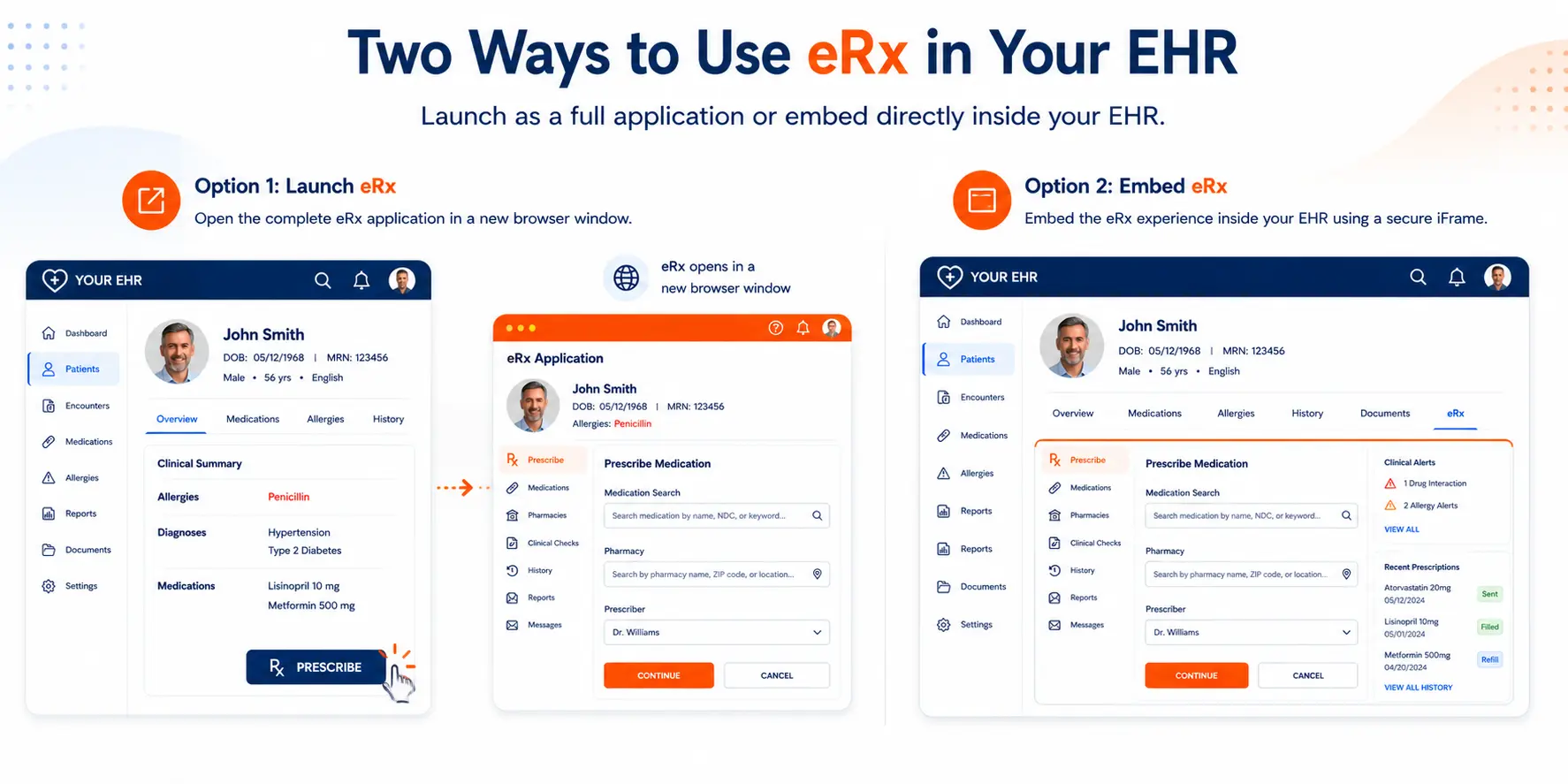
Launch LogiCoy eRx from the EHR as a web application.
Embed LogiCoy eRx inside the EHR using an iframe.
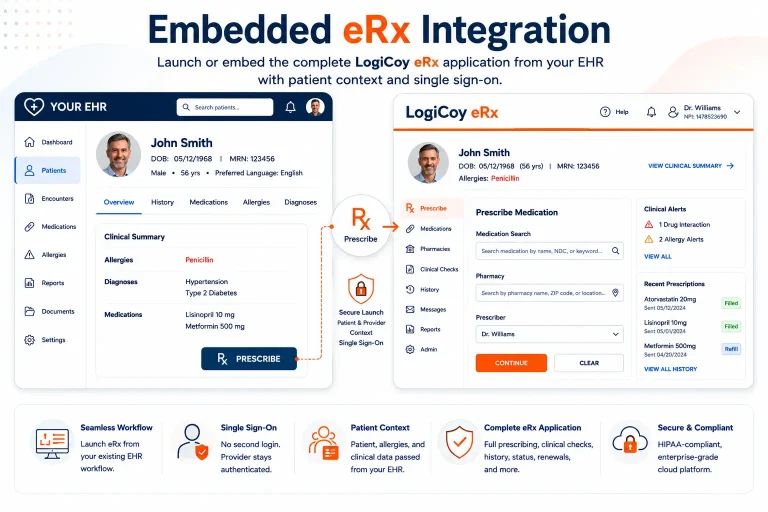
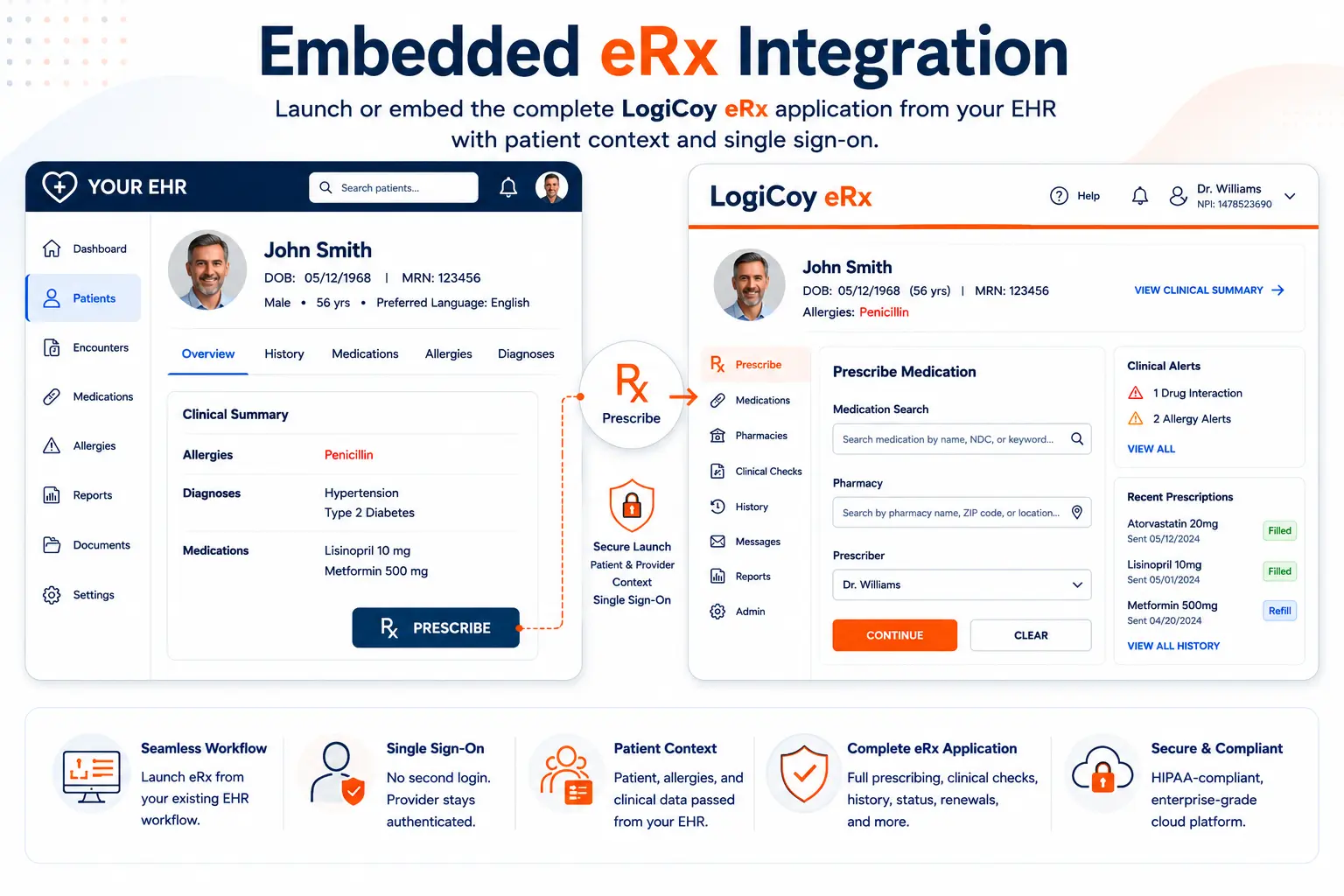
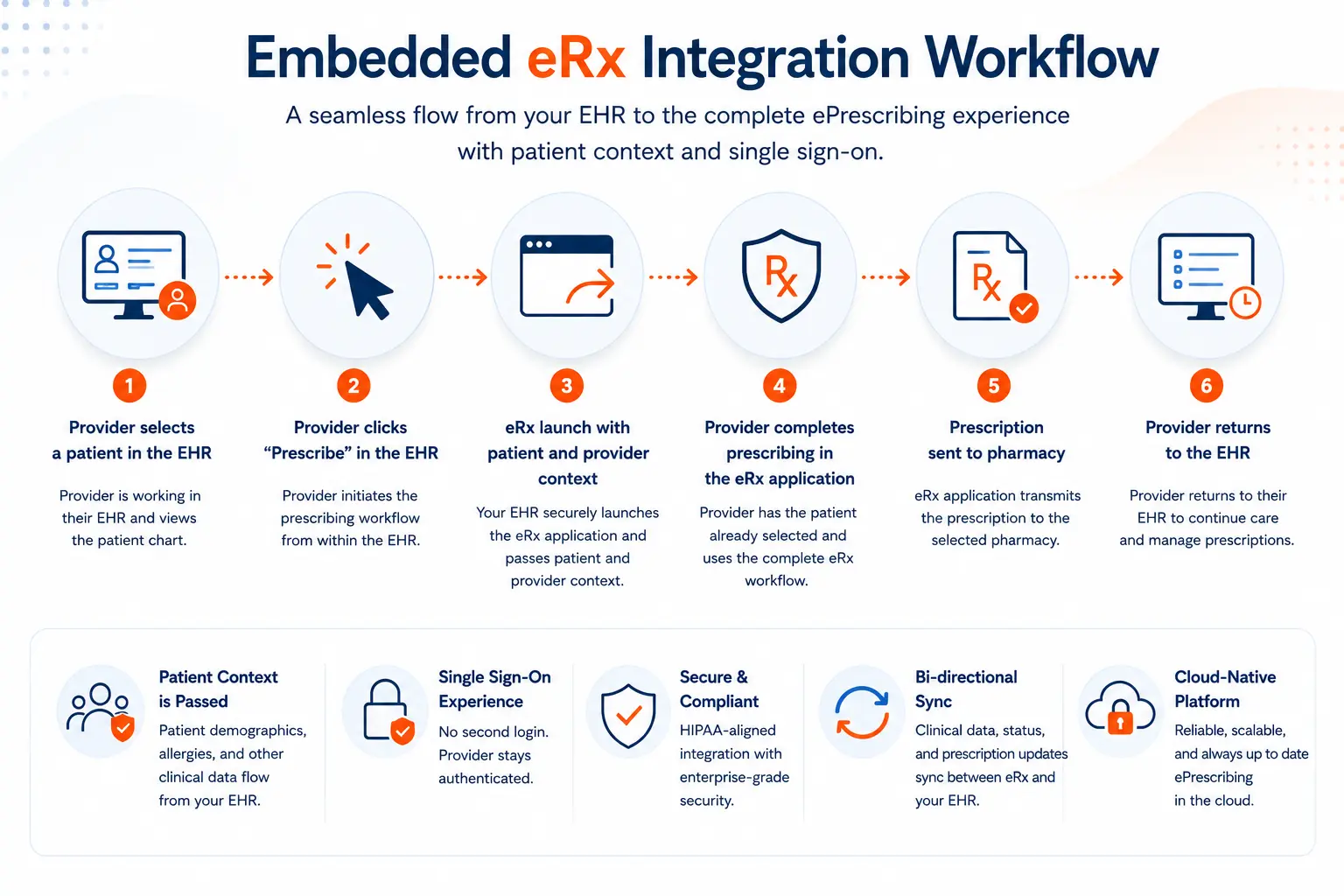
In both cases, the goal is the same: make ePrescribing available from the provider’s existing workflow without requiring the EHR vendor to build a complete ePrescribing UI. The basic experience can be as simple as: provider opens patient, clicks Prescribe, LogiCoy eRx opens, the patient is already selected, the provider prescribes, and then continues managing prescriptions. The integration securely establishes the session and passes the appropriate patient and provider context, and LogiCoy eRx provides the prescribing experience.
Connect your existing EHR workflow to LogiCoy eRx with the appropriate patient and provider context.
Your EHR Doesn’t Need Another ePrescribing UI
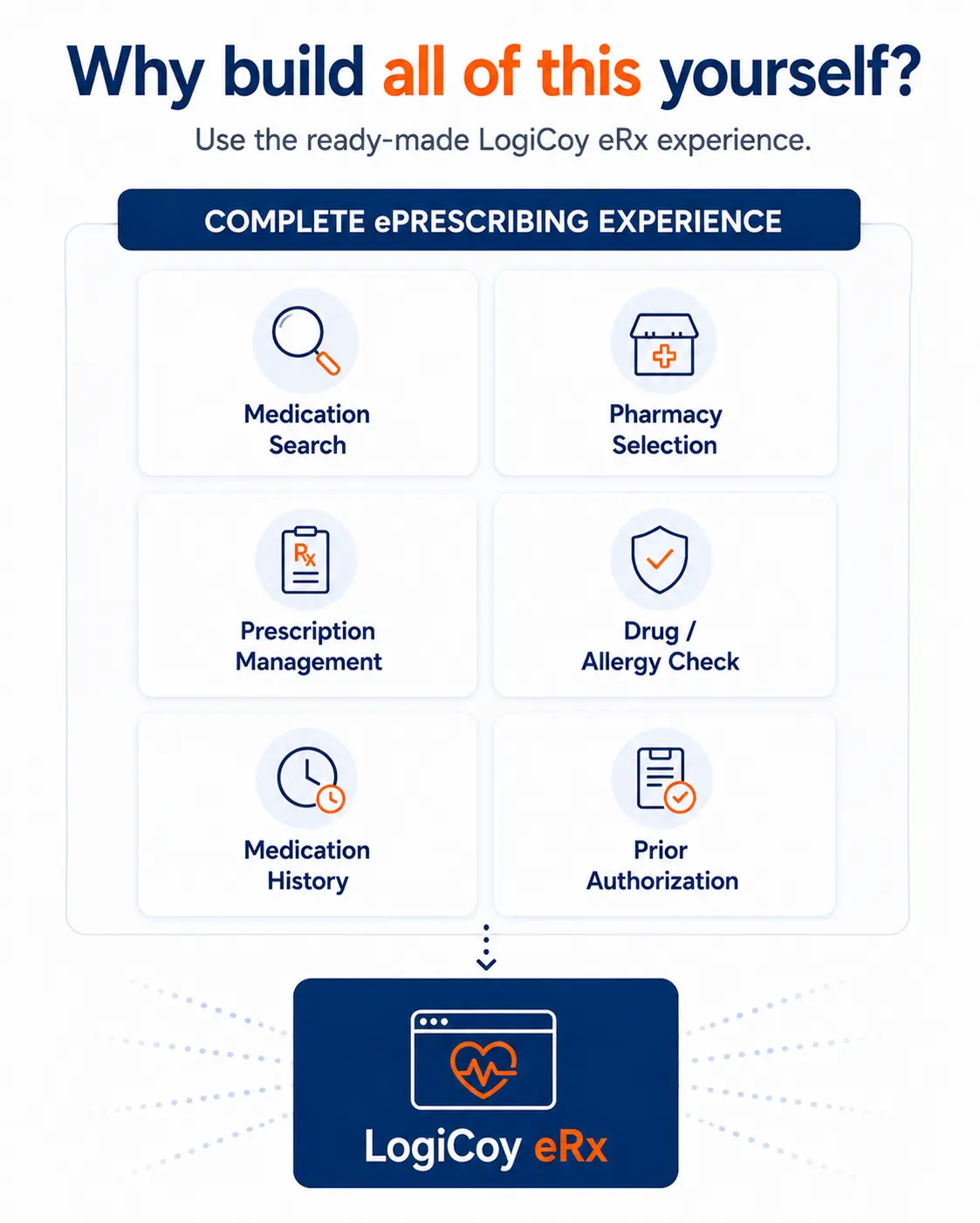
An ePrescribing solution involves much more than a button that sends a prescription. A complete prescribing workflow can involve many connected capabilities, and recreating each one inside your own application is a significant undertaking.
What a complete prescribing workflow includes
Patient information and medication search
Drug information, drug interaction checking, and drug-allergy checking
Pharmacy search and selection
Prescription creation and transmission
Controlled-substance prescribing (EPCS)
Medication history and prescription status
Prescription renewals and changes
Prescription benefits and electronic prior authorization
PDMP workflows and prescription history management
LogiCoy eRx already provides these capabilities as part of its ePrescribing platform and API ecosystem. With Embedded eRx Integration, you don’t have to recreate all of those capabilities in your own application. The prescribing application is already there.
Use the ready-made LogiCoy eRx application instead of building an ePrescribing UI from scratch.
A Familiar Workflow for Providers
Consider a provider using an EHR to treat a patient named John Smith. The provider is already viewing John’s patient chart. They click Prescribe. LogiCoy eRx opens, and John Smith is already selected. The provider doesn’t have to search for John Smith again or manually enter his information.
The provider completes the ePrescribing workflow in LogiCoy eRx and can continue managing prescriptions within the eRx application. This removes one of the common sources of friction when applications are connected together: having to repeat information that is already available in the EHR. LogiCoy supports patient synchronization from an external EHR, so patient information can be added, updated, or removed, along with supported clinical information such as allergies and diagnoses.
Choose how LogiCoy eRx fits into your EHR: launch it as a web application or embed it within your application.
No Second Login for the Prescriber
The integration is designed to fit into the provider’s existing workflow. When the provider launches LogiCoy eRx from the EHR, the integration can use the authenticated provider context to establish the appropriate eRx session. The provider doesn’t need to go through a separate LogiCoy eRx login as part of the normal launch experience.
This creates a much more natural experience:
EHR → Patient → Prescribe → LogiCoy eRx
rather than: EHR → open another application → log in → find patient → prescribe. The launch workflow uses secure authentication and provider context to establish the appropriate LogiCoy eRx session.
Launch eRx or Embed It Inside Your EHR
Every healthcare application has its own UI architecture and workflow. That’s why LogiCoy eRx supports different ways of presenting the ePrescribing experience.
Option 1: Launch LogiCoy eRx
The EHR can provide a Prescribe button or another entry point within its existing workflow. When the provider selects it, LogiCoy eRx opens as a web application. This approach can be useful when the EHR wants to keep its primary interface unchanged while giving providers easy access to a complete ePrescribing application.
Option 2: Embed LogiCoy eRx Using an iframe
For EHR vendors that want the ePrescribing experience to appear directly within their application, LogiCoy eRx can also be embedded using an iframe. This allows the provider to interact with the ePrescribing application without leaving the EHR’s overall interface. For embedded deployments, the appropriate application security configuration, including the required origin/CORS configuration, can be established as part of the integration. The choice is yours: launch the application or embed it into your existing UI.
Patient Context Can Flow From Your EHR
One of the most important parts of an embedded eRx application is ensuring that the provider doesn’t have to re-enter information that already exists in the EHR. LogiCoy provides patient synchronization capabilities that allow an EHR to send patient information to LogiCoy eRx.
What the EHR can synchronize
Patient demographics
Allergies
Diagnoses
Reference medications and other relevant information
This means the EHR can remain the primary source of patient information while LogiCoy eRx provides the specialized ePrescribing workflow. When the provider launches ePrescribing, the appropriate patient context is already available.
You Get the Complete eRx Application, Not Just a Prescription Form
This is an important distinction. Embedded eRx Integration isn’t simply about opening a form to create a prescription. The provider gets access to the LogiCoy eRx application. After entering the ePrescribing workflow, providers can prescribe and manage medications, review prescription information and history, check prescription status, and perform other supported ePrescribing activities.
LogiCoy’s platform includes prescription lifecycle management, medication history, pharmacy connectivity, real-time prescription benefits, electronic prior authorization, PDMP integration, and clinical decision support. The EHR vendor therefore doesn’t have to design, develop, test, and maintain another complete prescribing interface just to offer ePrescribing to its users. You can review the full platform capabilities on the LogiCoy cloud-based e-prescribing overview.
Embedded eRx vs. API Integration: When to Use Which
There isn’t one right integration model for every healthcare software company. LogiCoy gives you a choice.
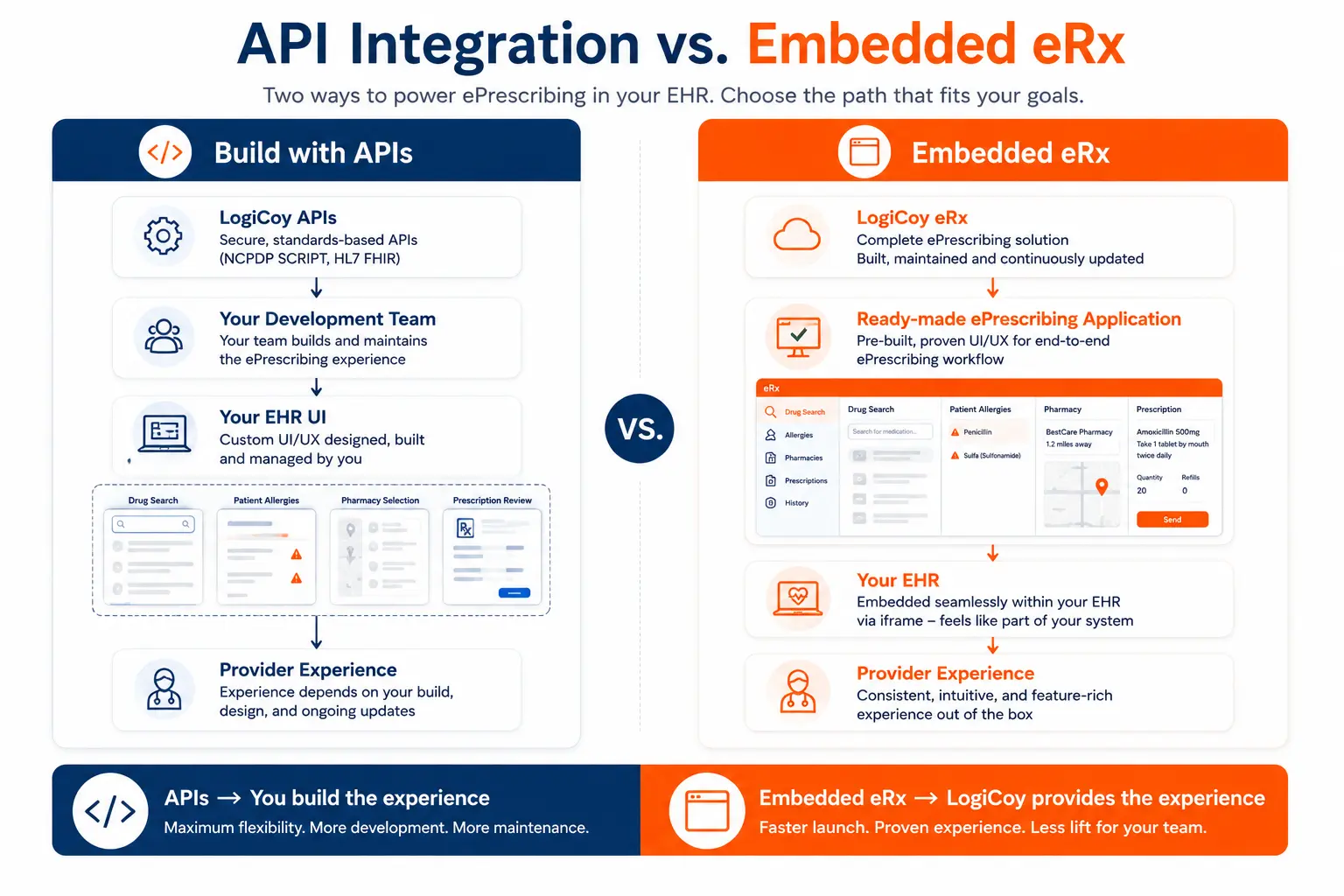
Build your own experience with APIs
If you want the ePrescribing experience to look and behave exactly like the rest of your EHR, you can use LogiCoy’s APIs. Your development team controls the UI and integrates the ePrescribing capabilities into your own workflows. LogiCoy provides REST APIs and FHIR APIs covering a broad range of ePrescribing and healthcare workflows. This approach gives you maximum control over the user experience.
Use Embedded eRx Integration
If you don’t need to build the ePrescribing UI yourself, you can use the ready-made LogiCoy eRx application. Your EHR provides the entry point and patient/provider context, and LogiCoy provides the ePrescribing application and workflow. This can significantly reduce the amount of eRx-specific UI development your team needs to undertake.
Build your own ePrescribing experience with APIs, or use the ready-made LogiCoy eRx application with Embedded eRx Integration.
If you want to…
Consider
Build your own ePrescribing UI
LogiCoy APIs
Have complete control over the provider experience
LogiCoy APIs
Add a ready-made ePrescribing experience
Embedded eRx
Avoid building eRx-specific screens
Embedded eRx
Launch eRx from an existing EHR workflow
Embedded eRx
Embed eRx directly inside your application
Embedded eRx
Combine custom workflows with LogiCoy capabilities
APIs + Embedded eRx where appropriate
You don’t have to choose based on what is technically possible. Choose based on how much of the ePrescribing experience you want to own. If you need help deciding, LogiCoy’s application integration services can guide the approach.
How Much Development Does Embedded eRx Require?
“Embedded” doesn’t mean zero development. Your EHR still needs to establish the integration, securely authenticate with LogiCoy, synchronize the appropriate patient information, and provide an entry point for launching the eRx application. But there is a major difference between integrating an existing application and building that application yourself.
With Embedded eRx Integration, your development team doesn’t need to recreate the complete ePrescribing interface inside your EHR. Instead, the integration connects your existing EHR workflow to the LogiCoy eRx application. The result is a focused integration effort rather than an eRx UI development project.
Why EHR Vendors Choose Embedded eRx Integration
Embedded eRx Integration can be particularly useful across a range of healthcare software companies.
Who benefits most from embedded ePrescribing
EHR and EMR vendors — add ePrescribing to an existing EHR without developing a complete eRx module.
Telehealth platforms — give providers access to ePrescribing directly from the virtual care workflow.
Digital health companies — add prescribing capabilities without diverting product and engineering effort toward building a separate prescribing application.
Healthcare startups — use a ready-made ePrescribing experience while focusing engineering effort on the features that differentiate their platform.
Healthcare system integrators — provide customers with an integrated ePrescribing workflow without developing a prescribing application from scratch.
Embedded eRx by the Numbers
2 integration models — launch as a web application or embed with an iframe, both using the same ready-made LogiCoy eRx application.
2.32 million healthcare professionals connected across the Surescripts network that LogiCoy eRx routes to.
30.5 billion transactions processed on the Surescripts network in 2025.
0 second logins — the launch workflow uses provider context, so the prescriber does not need a separate LogiCoy eRx login in the normal launch experience.
1 complete platform — EPCS, PDMP, medication history, real-time prescription benefits, and electronic prior authorization available through one application.
Built on a Production ePrescribing Platform
Embedded eRx Integration isn’t a standalone UI component disconnected from an ePrescribing platform. It brings the LogiCoy eRx application into your workflow. LogiCoy eRx is a cloud-based ePrescribing platform supporting controlled and non-controlled prescriptions, EPCS, PDMP integration, medication history, prescription benefits, electronic prior authorization, and clinical decision support. This gives healthcare technology companies another way to leverage an established ePrescribing platform while maintaining their own EHR experience.
Standards and Compliance
HL7 FHIR R5 — the interoperability standard for exchanging healthcare data, supported by LogiCoy eRx FHIR API endpoints.
DEA EPCS requirements — the federal requirements for electronic prescribing of controlled substances.
Surescripts — the national network for routing electronic prescriptions and related transactions.
Looking Ahead
Adding ePrescribing to an EHR doesn’t have to mean choosing between two extremes: build everything yourself, or send your users to a completely separate application. With Embedded eRx Integration, you can connect your existing EHR workflow to a ready-made ePrescribing application. Your provider can select a patient, click Prescribe, and enter the LogiCoy eRx workflow with the appropriate patient and provider context. You can launch the application separately or embed it within your EHR, and your development team can focus on integrating the workflow rather than rebuilding an entire ePrescribing application.
You build the healthcare experience that differentiates your product. Let LogiCoy provide the ePrescribing experience. Want to add ePrescribing to your EHR without building an eRx module? Talk to LogiCoy about eRx integrations.
Frequently Asked Questions
What is Embedded eRx Integration?
Embedded eRx Integration allows an EHR or healthcare application to launch the ready-made LogiCoy eRx application from within its existing workflow. The application can be launched as a web application or embedded using an iframe.
Do I need to build an ePrescribing UI to use LogiCoy eRx?
No. LogiCoy provides two integration approaches. You can use REST and FHIR APIs to build your own ePrescribing experience, or use Embedded eRx Integration to launch the ready-made LogiCoy eRx application.
Can LogiCoy eRx be embedded inside an EHR?
Yes. LogiCoy eRx can be embedded within an EHR using an iframe, subject to the required security and application configuration.
Can the patient context be passed from my EHR?
Yes. LogiCoy supports patient synchronization from an external EHR. Patient information can be added, updated, and synchronized with LogiCoy eRx, along with supported clinical information such as allergies and diagnoses.
What is the difference between LogiCoy eRx APIs and Embedded eRx Integration?
With the APIs, your development team builds the ePrescribing experience into your own application. With Embedded eRx Integration, LogiCoy provides the ready-made ePrescribing application and your EHR integrates with and launches that experience.
Vishnuvardhan Piskala is the co-founder and technical director of LogiCoy, with more than 15 years of experience in healthcare technology and software development. His expertise spans e-Prescribing, PDMP, HL7, FHIR, and healthcare interoperability, He works closely with healthcare organizations and technology vendors to design secure, scalable solutions for exchanging prescription and healthcare data.